

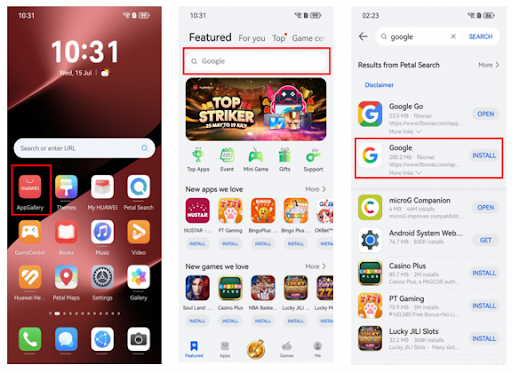
Most app problems on a Huawei phone are less dramatic than they first appear. A service may open but refuse to sign in, notifications may arrive late, location can stop updating or an app may fail after an update. These problems are easier to solve when you troubleshoot the exact symptom instead of reinstalling everything at once.
Identify what is actually failing
Start by asking one question: does the app fail to install, open, sign in or complete a specific task? AppGallery is the first place to check for an official version and update. Petal Search can also show whether the service is available as a native app, Quick App or web app.
A search for google installer for huawei often mixes several different problems together. Separating them makes troubleshooting faster and reduces the chance of installing unnecessary packages.
When an app will not install
Check that the phone has enough free storage and that the software is up to date. If Petal Search downloaded an installation package, Huawei support notes that installation permissions may need to be allowed for Petal Search on some EMUI versions.
Do not keep downloading different copies of the same app. Multiple packages from unrelated sources can make updates and logins more confusing later.
When the app opens but does not work properly
For sign-in errors, switch between Wi-Fi and mobile data and make sure date and time are set automatically. For missing notifications, review notification permissions and battery settings. For maps or ride-hailing apps, check location permission and test GPS outside if necessary.
If a web version works while the app does not, that is useful information. It suggests the account and network are probably fine, so the problem is more likely to be the installed app or its local environment.
Know when to use a fallback
Some services do not need a native app to be useful. Email, cloud documents, video and search tools can often be used from an official website while you sort out the app problem.
Use the Huawei Community guide at google installer for huawei when the problem is specifically related to Google setup on Huawei. The practical goal is not to force every service into one installation method; it is to get the functions you need working reliably and keep the phone easy to update.
